Guide

Last updated: August 27, 2026
TL;DR
OpenCode is an open source AI coding agent built for the terminal, with desktop and IDE options too.
It is MIT licensed, free to run, and model-agnostic. You pay only for the model tokens you use.
It is a full agent harness (tool loop, LSP diagnostics, session management), not a chat wrapper.
There are 75+ LLM inference providers on OpenCode.
The best coding model changes almost every month, and the agent you work in should let you experiment with new models freely. OpenCode is built for exactly that. It is an open source coding agent that runs in your terminal and connects to almost any model from almost any provider, so the harness stays the same while the models underneath it change as fast as the field does.
This guide covers what OpenCode is, how to install and configure it, and how it compares to Claude Code, Cursor, Aider, and Codex.
What is OpenCode?
OpenCode is an open source AI coding agent that lives in your terminal. It reads and edits files, runs shell commands, and works through multi-step tasks on your codebase, all from a terminal UI. It is also available as a desktop app and an IDE extension, so you can use the same agent across surfaces.
It is built by Anomaly and the OpenCode community, and it is one of the most popular open source agents available, with over 180,000 GitHub stars and a large contributor base. The project is MIT licensed, which means the tool itself is free. Your only cost is the model inference you run through it.
The important distinction: OpenCode is a full agent harness, not a thin chat wrapper around an API. It has a real tool loop, Language Server Protocol (LSP) integration so the agent can read diagnostics as feedback, and session management for keeping separate pieces of work isolated. It runs on a client/server architecture, which is why the terminal, desktop, and IDE surfaces can all talk to the same engine.
Key features of OpenCode
Model flexibility. OpenCode connects to 75+ providers out of the box through its Models.dev integration, and to any OpenAI-compatible endpoint beyond that. You can route different tasks to different models: a fast, cheap model for simple questions, a reasoning model for architecture, and a coding-specialized model for implementation.
Plan mode and Build mode. Plan mode disables the agent's ability to change files and instead has it draft how it intends to implement something. Once the plan looks right, you switch to Build mode and it makes the changes. Toggle between them with the Tab key.
Built-in tools. The agent reads, writes, and edits files, runs shell commands, and uses LSP diagnostics as feedback while it works. It completes real work in your repo instead of handing you snippets to paste.
Multi-session support. Each session has its own context window, history, and model configuration, so you can keep a research session separate from an implementation session, or push several features forward at once without them bleeding into each other.
Agents and subagents. You can define specialized agents with their own prompts, models, and tool access. OpenCode ships with two primary agents, Build and Plan, and you can add your own for the work you repeat.
Custom commands. Store reusable prompts as Markdown files, per user or per project, with named argument placeholders. A prompt you retype ten times a day becomes a single command.
MCP servers. OpenCode supports the Model Context Protocol, so you can connect external tools and services and expose them to the agent automatically, which means the agent can reach context that does not live in your repo.
**AGENTS.md.** A project rules file that gives the agent persistent context about your architecture and conventions, so you stop re-explaining your project on every run.
Themes, keybinds, formatters, permissions, and conversation sharing round out the customization surface.
How to set up OpenCode
Prerequisites
OpenCode runs in any standard terminal, so the built-in Terminal or iTerm on macOS and most Linux terminals work out of the box. The only hard requirement is API keys for whatever models you plan to use. If you want the smoothest experience, the OpenCode team recommends a GPU-accelerated emulator like WezTerm, Ghostty, Alacritty, or Kitty, but that is optional. On Windows, we recommend running OpenCode inside Windows Subsystem for Linux (WSL) for the best compatibility.
Install OpenCode
The quickest path is the install script:
Or use a package manager. With Node.js:
With Homebrew on macOS and Linux (the tap gets the most up-to-date releases):
On Arch Linux:
On Windows, Scoop, Chocolatey, Mise, and Docker are all supported:
Once OpenCode is installed, the next step is to connect a model provider. The fastest and most flexible option is Pioneer, so we start there.
How to set up LLM inference providers for OpenCode
Connect OpenCode to the 75+ LLM inference provider, using /connect command in the CLI or Connect provider menu in the desktop app.
First, create an account on your inference provider of choice and grab your API key.
If using the OpenCode CLI: in a fresh terminal, start OpenCode:
Type
/connectcommand and select your provider from the drop-down list or click on "Connect provider" menu in the desktop app.
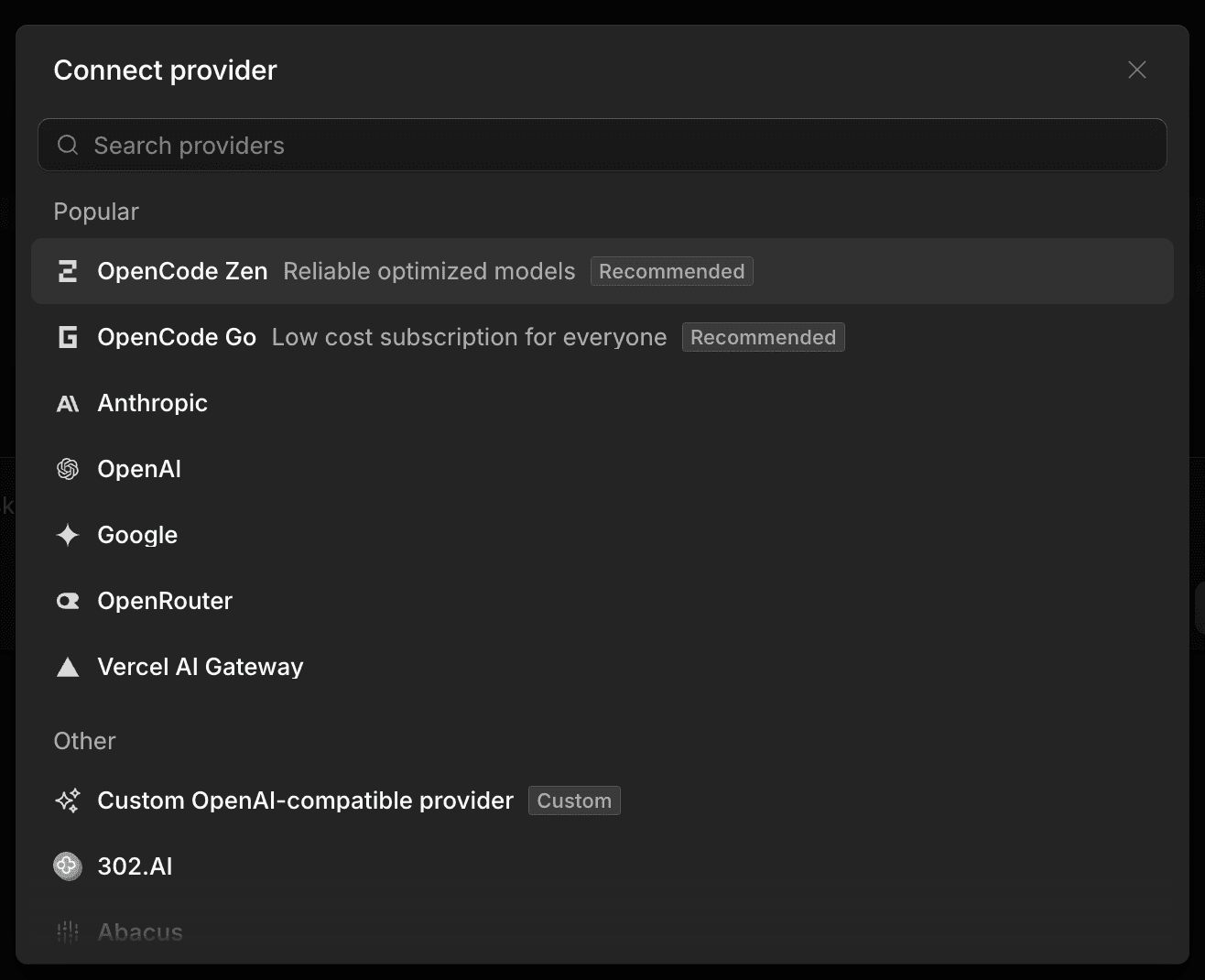
Add in your API key.
To switch between models, use the
/modelscommand.
Initialize your project and start coding
With a provider connected, move into the project you want to work on and start OpenCode:
Then initialize it:
This analyzes your project and creates an AGENTS.md file in the root. Commit that file to Git. It gives OpenCode durable context about your structure and coding patterns, so you do not have to re-explain your project on every run.
Ask questions and build features
You can ask questions about the codebase, using @ to fuzzy-search for files:
For a larger change, plan first. Press Tab to switch to Plan mode and describe what you want, in the level of detail you would give a junior engineer:
Once the plan looks right, press Tab again to return to Build mode and tell it to proceed. If a change is not what you wanted, undo it:
You can run /undo multiple times, and /redo to reapply.
Customize
From here you can pick a theme, remap keybinds, configure formatters, write custom commands, and add MCP servers. All of it is optional, and none of it is required to be productive on day one.
OpenCode vs other AI coding agents
The 2026 field of coding agents splits into open source terminal tools, IDE-first products, and vendor CLIs. Here is how OpenCode sits next to the main alternatives.
Tool | Open source | Surface | Model flexibility | Cost model | Standout strength |
|---|---|---|---|---|---|
OpenCode | Yes (MIT) | Terminal, desktop, IDE | Very high (75+ providers) | Free tool, pay per token | Model-agnostic, no lock-in |
Claude Code | No | Terminal | Anthropic models | From $20/mo | Benchmark-leading agentic runtime |
Cursor | No | IDE | Multiple, curated | From $20/mo | IDE-native, cloud agents |
Codex CLI | Yes (Apache 2.0) | Terminal | OpenAI models | Free tool, pay per token (or ChatGPT plan) | Top Terminal-Bench scores |
Aider | Yes (Apache) | Terminal | High | Free tool, pay per token | Git-native workflow |
Cline | Yes (Apache 2.0) | IDE (VS Code), CLI | Very high (bring your own key) | Free tool, pay per token | Autonomous editing with human checkpoints |
Kilo Code | Yes (Apache 2.0 / MIT) | VS Code, JetBrains, CLI | Very high (500+ models) | Free tool, pay per token | All-in-one agentic platform |
Pi | Yes | Terminal | Very high (bring your own key) | Free tool, pay per token | Minimal harness you reshape |
Devin | No | Cloud, IDE, Slack | Managed (frontier models) | From $20/mo (usage-based) | Autonomous cloud software engineer |
Hermes | Yes | Terminal, desktop | Very high (multi-model) | Free tool, pay per token | Persistent memory, self-improving |
OpenClaw | Yes (MIT) | Self-hosted, cross-platform | Very high (bring your own key) | Free tool, pay per token | Self-hosted personal agent with skills |
Where OpenCode wins. It is open source and MIT licensed, it works across terminal, desktop, and IDE, and it is not tied to any one model vendor. You pay only for tokens, and you can extend it with MCP servers, custom agents, and plugins.
Where the others win. Claude Code is the most complete agentic runtime on the benchmarks today, and its persistent CLAUDE.md context file is excellent. Cursor is IDE-first and has moved fast on cloud and parallel agents. Codex CLI posts the top Terminal-Bench scores with GPT-5.5. Aider pioneered the git-native workflow, though its 2026 model guidance is less actively maintained than the others. If you live in an IDE rather than a terminal, Cline and Kilo Code are the strongest open source options, both bring-your-own-key and model-agnostic, with Kilo Code reaching across VS Code, JetBrains, and the CLI. Pi is the pick if you want a minimal harness to reshape into your own tooling. Devin is the outlier: a proprietary, cloud-hosted autonomous engineer that runs long tasks on its own rather than a local agent you drive. Hermes and OpenClaw sit at the autonomous-agent end of the spectrum, both open source and model-agnostic: Hermes brings a persistent-memory learning loop from Nous Research, and OpenClaw is a viral self-hosted personal agent that runs skills across your machine rather than a focused coding harness.
Choose OpenCode when you want control, model choice, and no lock-in.
Common workflows and tips
Plan before you build. For anything beyond a small edit, use Plan mode first. Reviewing intent before the agent touches files catches wrong assumptions early and saves cleanup.
Invest in AGENTS.md. Document your architecture, conventions, and the patterns you do not want the agent to use. A good AGENTS.md is the difference between an agent that fits your codebase and one that fights it.
Route models by task. Use a fast, inexpensive model for quick questions, a reasoning model for design decisions, and a coding-specialized model for implementation. With Pioneer this is one easy step by typing
/modelsand choosingpioneer/autoas your model.Run parallel sessions. Keep a research session and an implementation session open at once, each with its own context window.
Share when you need a second set of eyes.
/sharecreates a link to the current conversation for a teammate.Add MCP servers for external context. Connect the tools and services your agent needs so it can pull in context beyond the local repo.
Troubleshooting and FAQ
Is OpenCode free?
The tool is free and MIT licensed. You pay only for the model tokens you consume through whatever provider you configure.
Does OpenCode work on Windows?
Yes. We recommend running it inside WSL for the best performance and full feature compatibility.
What models does OpenCode support?
Effectively any model, through 75+ providers with native integration with OpenCode.
OpenCode vs Claude Code, which is better?
Claude Code leads the benchmarks today and is tightly integrated with Anthropic's models. OpenCode is open source and model-agnostic. If you want vendor-independent control and model choice, OpenCode is the better fit.

Fastino Inc. (“Fastino”) develops specialized AI models and provides APIs designed to support structured data extraction, classification, reasoning, and production AI workflows. Fastino is a technology company and does not provide legal, financial, compliance, or advisory services.
Any outputs, predictions, classifications, or decisions generated through Fastino models are based on the configuration, data, and implementation provided by the customer. Fastino does not control, verify, or guarantee the accuracy, completeness, or suitability of model outputs for any specific purpose. By using this website or Fastino’s models and services, you acknowledge that all content and outputs are provided for informational and operational purposes only and agree to our Terms of Use and Privacy Policy.
2026 Fastino Inc.
All rights reserved