Guide

Last updated: August 27, 2026
TL;DR:
Open-Weight vs. Open-Source: Open-weight models publish their trained parameters for local deployment, fine-tuning, and hosting. True open-source requires publishing training data and source code as well, which is rare for frontier-scale models.
Performance Parity: Leading open-weight models like Kimi K3 and GLM 5.3 are now neck-and-neck with closed-source frontier models. On the Artificial Analysis Intelligence Index, Kimi K3 and GLM 5.3 score 60, just three points behind Claude Opus 5 at 63.
Enterprise Control & Costs: Self-hosting or using hosted open-weight endpoints provides complete data governance and can slash inference costs by up to 56% with negligible impact on output quality.
Switching from frontier closed source models is simpler than most people think.
To use an open-weight model, choose one whose license permits your use case, deploy it locally or through a hosted endpoint, and evaluate it on representative tasks before fine-tuning. This post walks through that process.
What Are Open-Weight Models?
An open-weight model is a model whose trained parameters (weights) are published and downloadable. Anyone can run them locally, fine-tune them on custom data, or host them on their own infrastructure.
This is distinct from open-source models, which also release their original training datasets and training code. At the frontier scale, true open-source releases are almost non-existent; open-weight is the standard delivery mechanism.
License Considerations
Before you use an open-weight model, confirm that its license permits your commercial use case, deployment method, and expected revenue level.
Revenue Gates:
Kimi K3: Requires a separate commercial agreement with Moonshot once annual revenue exceeds $20M.
MiniMax-M3: Requires prior written authorization above $20M ARR.
Qwen3.8-Max: Requires written permission for service deployment above $50M annual revenue.
Permissive Licenses (No Gates): GLM 5.2, DeepSeek V4, and Qwen3.8-27B are released under highly permissive licenses (MIT or Apache 2.0) with zero revenue thresholds.
The Top Open-Weight Models
According to the Artificial Analysis Intelligence Index v4.1.1 (August 2026), the performance gap between open and closed models has narrowed to a rounding error:
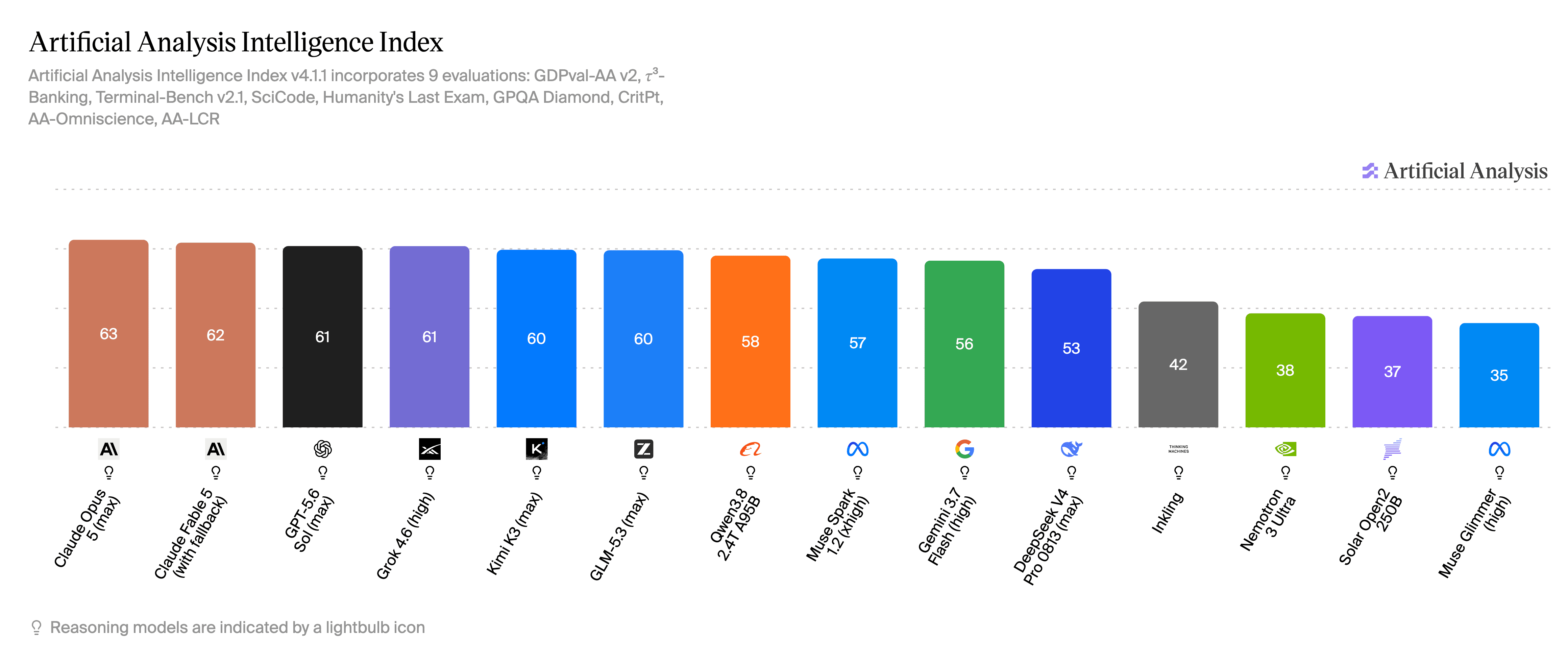
The Top Performers: Kimi K3 and GLM 5.3 tie at 60 on the index, trailing Claude Opus 5 (63) by only three points. Note that while GLM 5.3's performance is verified, Z.ai has delayed releasing its weights until late August.
The Best Value: Qwen3.8-27B is punching far above its weight. It scores 52 on the index, costs just $0.40 per million tokens, and can run locally on a single consumer GPU (RTX 4090) in 4-bit precision.
The Harness Caveat: Models are often benchmarked on custom harnesses optimized for their architecture. For example, GLM 5.2 scores 81.0 on standard evaluation harnesses and 82.7 on its optimized setup. Compare models with the same evaluation harness, configuration, and task-specific tests before choosing one for deployment.
Selected Open Model Comparison (August 2026)
Model | Total / Active Params | Context Window | License | Best Suited For | Pricing (In/Out per 1M tokens) | Local Execution |
|---|---|---|---|---|---|---|
Kimi K3 | 2.8T / 104B | 1M | Kimi K3 License (Agreement >$20M/yr) | Agentic coding, long documents, vision | $3.00 / $15.00 | No - MXFP4 (4-bit) quantization-aware training |
Qwen3.8-27B | 27B (dense) | 262K (extends to 1M) | Apache 2.0 | Best value coding, vision, document extraction | $0.50 / $3.00 | Yes (~17–19 GB at 4-bit) |
DeepSeek V4 Pro | 1.6T / 49B | 1M | MIT | Reasoning, frontier coding | $0.66 / $1.98 (off-peak) | No |
GLM 5.3 | 753B | 1M | TBD (weights pending) | Ties Kimi K3 for 19% lower cost | $1.40 / $4.40 | No (weights pending) |
Gemma-4-26B-A4B | 25.2B / 3.8B | 256K | Apache 2.0 | Cheap multimodal, edge tasks | $0.12 / $0.37 | Yes |
gpt-oss-20b | 22B / 3.6B | 131K | Apache 2.0 | Cheap, fast classification | $0.075 / $0.30 (on Groq) | Yes (~16 GB) |
Nemotron 3.5 Lightning | 30B / 3B | 1M (256K on one H100) | OpenMDW v1.1 | Latency-critical agents, fine-tuning base | Varies by host | Yes (requires one H100) |
GLiNER2 | 205M / 340M | Encoder - 8.2K | Apache 2.0 | Extraction, classification, PII, guardrails | $0.15 / $0.15 (Fastino) | Yes (CPU only) |
Why You Should Consider Using Open-Weight Models?
Complete control of your proprietary data
Healthcare, legal, and finance work carries privacy and residency requirements that a third-party API endpoint can’t satisfy on its own. Separately, a company’s proprietary data is often its actual moat, built up over years of operations, and sending it to an outside provider means that asset leaves the building.Cost Savings & Margin Improvement
If inference is one of your biggest variable costs, open-weight models offer massive relief. For example, third-party hosting for GLM 5.2 is priced as low as $0.50/$3.15 per million tokens compared to Z.ai's native price of $1.40/$4.40. When an open-weight model trails a frontier model by three points, route routine traffic to the open-weight model and reserve frontier calls for harder cases. This approach can reduce inference costs while preserving quality where it matters most. AT&T is the latest example that companies are past debating this and into shipping it. It built its cost routing on LiteLLM, scoring each query for complexity before deciding whether it needs a frontier model or can go cheaper. The results: costs on coding and other advanced tasks down by as much as 56%, with output quality dropping only 2%. Roughly 40% of employee queries now run on open models, Nvidia's Nemotron, Meta's Llama, and Google's Gemma among them, with AT&T targeting 60 to 70% in the coming years.Higher Throughput and Low Latency
A competitive ecosystem of AI gateway providers runs hardware-optimized stacks that deliver great performance. For example, gpt-oss-20b runs at ~1,000 tokens/sec on Groq, and Cerebras serves gpt-oss-120b at ~3,000 tokens/sec. On Kimi K3, third-party providers can serve the weights at 66 tokens/sec compared to Moonshot's native endpoint at 26 tokens/sec for the exact same price.Opportunities for specialized, task- and domain-specific models
Fine-tuning adapts an open-weight model to a defined task using your own labeled examples. Start by evaluating the base model on held-out task data, then use LoRA or QLoRA to freeze the base model and train a small set of added parameters. Fastino-Nemotron-3.5-Lightning-Finance, a model fine-tuned on Nemotron 3.5 Lightning for finance domain, raised FinQA execution accuracy from 15.86% to 59.23% over its base model. A model tuned on customer-owned data can retain task knowledge that competitors do not have. Open-weight access makes this type of adaptation possible.No forced migration
When you host the weights, you control the deployment lifecycle and can schedule model changes on your own timeline. This lets your team re-test prompts, evaluations, and integrations before a migration.
Which Model for Which Task?
Agentic Coding (Top Performance): Kimi K3 or GLM 5.3
Agentic Coding (Best Value): Qwen3.8-27B or DeepSeek V4 Pro
Long Documents: Kimi K3 (scores 74.7 on AA-LCR) or DeepSeek V4 Flash
High-Volume, Low-Cost Classification: gpt-oss-20b (on Groq) or Gemma-4-26B-A4B
Structured Extraction, PII Filtering, & Guardrails: GLiNER2 (205M parameter encoder model)
Latency-Critical Agents: Nemotron 3.5 Lightning
Self-Hosting on a Consumer GPU: Gemma-4 E4B-it runs unquantized at BF16 on a single RTX 4090 (roughly 16 to 19 GB of VRAM); Qwen3.8 27B fits the same card at 4-bit quantization (14 to 16 GB)
How to Run Inference with Open-Weight Models
Choose an inference path based on where the model runs, the data it can access, and your latency and control requirements. Developers typically run an open-weight model locally, deploy it on their own infrastructure, or use a hosted endpoint:
Path 1: Local IDE Integration & Coding Tasks
For daily software development, choose an open-weight model that your IDE tool supports, then connect the tool to a local runtime or a hosted provider endpoint. Most modern development tools and agents let you select the model separately from the coding interface.
Built-in Menus: Select open models directly from the tool's native UI. For example, Devin Desktop supports a range of open models. OpenCode Zen hosts GLM 5.2, Kimi K3, Qwen 3.7, DeepSeek V4, and MiniMax M3 out of the box, making it a highly cost-effective sandbox.
Custom Base URLs: If you use IDE extensions like Cline, OpenCode, Zed, Aider, Continue, Kilo Code, Goose, Factory, or GitHub Copilot, simply configure them to point to your custom open-weight provider endpoint. Cline offers prompt-based fallbacks for models with less robust native tool-calling capabilities.
Codex: Run with the -oss flag to interface directly with Ollama or LM Studio, or edit the model_providers configuration to support custom base URL.
Claude Code: Update the environment variables in your config file to direct requests to an open-weight provider: Note: Z.ai publishes official instructions for running GLM models under similar configurations.
Path 2: Production Application APIs (Cloud-Hosted)
For production-grade applications, migrating from closed-source APIs to hosted open-weight models is usually a simple two-line change: update your API client's base_url and model string.
In 2026, developers have a wide range of choices for AI Gateways. OpenRouter (acquired by Stripe) is known for model variety and breadth. Groq & Cerebras are both built for ultra-low latency and maximum token-per-second throughput. Together AI & Fireworks are optimized for scalable, high-throughput production workloads.
Fastino's inference platform hosts our GLiNER family of models (GLiNER2, GLiNER2.5) and specialized fine-tuned models like Fastino-Nemotron-3.5-Lightning-Finance and Fastino-Nemotron-3.5-Lightning-Healthcare behind a single API key, so you can route queries dynamically across all of them.
If you use a different gateway, check its documentation, but the process is typically the same: swap the base URL, model string, and API key.
Note: If your codebase is heavily committed to the Anthropic SDK, you don't need to rewrite it all. You can either convert the calls to the standard OpenAI format or place LiteLLM in front of your app as an OpenAI-compatible proxy.
Path 3: Self-Hosting (Running the Weights Locally)
If you require maximum security, run the weights directly on your hardware. We'll start with a model that runs unquantized on a single consumer GPU: Gemma-4 E4B-it (8B total / 4.5B effective parameters, Apache 2.0), which needs roughly 16–19 GB of VRAM at full BF16 precision - within reach of a single RTX 4090.
Download the Weights
Use thehfCLI instead ofgit cloneto avoid downloading Git LFS/Xet pointer stubs instead of the actual weights:Launch the Inference Server
Install vLLM and serve the model. No--trust-remote-codeflag is needed here — Gemma 4 is natively supported in vLLM:The
--max-model-lenflag caps the context at 32K (out of the model's 128K maximum) to leave headroom for the KV cache on a 24 GB card. You can raise it if you have more VRAM. Note that E4B is multimodal (text, image, and audio inputs).vLLM is CUDA/Linux-first. On Apple Silicon, use LM Studio or Ollama with the official MLX builds of the same model instead.
Redirect Your Application Client
Point your standard OpenAI client directly at your local instance:
The hardware ceiling: An 8B model is the comfortable ceiling for unquantized consumer-grade hosting. BF16 weights require roughly 2 GB of VRAM per billion parameters, so larger models outgrow a single consumer card quickly:
Qwen3.8 27B requires 55.6 GB at BF16, beyond any consumer GPU.
A 30B-class model like the Fastino Nemotron 3.5 Lightning fine-tune (a 65.85 GB fully-merged checkpoint) needs about 66 GB of VRAM just to load, meaning an 80 GB datacenter GPU (A100 or H100) before accounting for KV cache and context overhead.
Quantization compresses weights from 16-bit floats to 8-bit, 4-bit, or lower, which dramatically reduces the VRAM required to run the model. At 4-bit, Qwen3.8 27B requires 14–16 GB of VRAM, so it can run on an RTX 4090 with capacity left for the KV cache and other runtime overhead. For frontier-scale weights (Kimi K3's 2.8T parameters, or GLM 5.3 once its weights are public), no amount of quantization makes a laptop viable, which is exactly what Path 2's hosted endpoints are for.
Other Technical Considerations Before You Swap
Self-hosting or moving to third-party endpoints introduces infrastructural challenges that closed APIs abstract away:
Tool Calling requires manual configuration
Open-weight models formulate tool-calling outputs in highly specialized syntaxes. The serving software must parse these outputs into an OpenAI-compatible tool_calls array (vLLM provides roughly two dozen model-family-specific parsers). If you select the wrong parser, tool calls will arrive as plain text, causing silent application failures without throwing explicit errors.Structured Output is not standardized
Verify whether the serving provider supports JSON object mode, JSON schema mode, or true constrained decoding (guided generation), then test the required schema with representative requests before deployment.Prompt Caching is host-dependent
Prompt caching resides in the infrastructure layer, not the weights. This determines your operational cost: for instance, DeepSeek's standard input pricing is $0.22 per million tokens but drops to $0.007 on a cache hit.Context Limits are set by the deployment
A host provider's hardware or serving-stack configuration can limit the available context length below the model's advertised context window.
Sampling Defaults vary wildly
Unoptimized parameters can degrade performance. In a reproducible evaluation, Qwen3.8's default temperature of 1.0 led to degenerating, repetitive output past 20k tokens. Lowering the temperature to 0.1 fully resolved the issue.Production Best Practice: "It compiles" is not the same as "it performs." Before routing production traffic, gather a representative evaluation set of at least 20 real user queries, run them through both models, and systematically analyze the output diffs.
Note: If you're only using open models through coding assistants like Cline, OpenCode, or Claude Code pointed at hosted endpoints, the provider handles tool-call parsing and caching.
Frequently Asked Questions
What is the difference between open-weight and open-source models?
Open-weight models make trained parameters available to download, run, and fine-tune. An open-source release may also include source code, training code, and documentation about training data, although frontier-scale model releases rarely provide every underlying dataset.
Are open-weight models free to use?
The parameters are usually free to download, but commercial usage may be restricted by revenue thresholds. For example, Kimi K3 and MiniMax-M3 require separate agreements once you exceed $20M in annual revenue, and Qwen3.8-Max (the flagship 2.4T model) above $50M for model-as-a-service businesses. GLM 5.2, DeepSeek V4, and Qwen3.8 27B are completely unrestricted under MIT or Apache 2.0 licenses. Hosting and inference costs always apply.
Do I need a GPU to use open-weight models?
No. You can use a cloud-hosted provider, such as Fastino (for our GLiNER and fine-tuned models), OpenRouter, Groq, or Cerebras, through a standard API without local hardware. For local deployment, check the model's memory requirements and start with a GPU if the model is too large or slow on your CPU; models such as GLiNER2 can run on a CPU alone.
Can I run open-weight models in production?
Yes. Major enterprises are already deploying them at scale. For example, AT&T routes roughly 40% of its internal employee queries to open models like Nemotron, Llama, and Gemma, with plans to scale that to 60–70%.
Which open-weight model is best for coding?
For high performance on agentic coding, Kimi K3 or GLM 5.3 are the premier choices. For the best cost-to-performance ratio, Qwen3.8 27B provides outstanding results and can run on a single RTX 4090 at 4-bit quantization. If you want to self-host without any quantization at all, Gemma-4 E4B-it runs at full BF16 precision on the same class of card and still scores 52% on LiveCodeBench v6. DeepSeek V4 Pro is also a highly capable choice for reasoning-heavy development tasks.
How do I switch from the OpenAI API to an open-weight model?
In your client library, update the base_url and model string. While this handles the migration for most codebases, you will need to verify and configure tool calling, structured outputs, and prompt caching on your serving infrastructure, as these do not carry over automatically from the client.

Fastino Inc. (“Fastino”) develops specialized AI models and provides APIs designed to support structured data extraction, classification, reasoning, and production AI workflows. Fastino is a technology company and does not provide legal, financial, compliance, or advisory services.
Any outputs, predictions, classifications, or decisions generated through Fastino models are based on the configuration, data, and implementation provided by the customer. Fastino does not control, verify, or guarantee the accuracy, completeness, or suitability of model outputs for any specific purpose. By using this website or Fastino’s models and services, you acknowledge that all content and outputs are provided for informational and operational purposes only and agree to our Terms of Use and Privacy Policy.
2026 Fastino Inc.
All rights reserved